The API will be in the form of JavaScript library you include in your own code.
<script src="https://apps.alpha-vision.com/api/AlphaVRApiv1.2.4.min.js"></script>¶ Initialization
Declare an API variable. This will Initialize the scene, the variable will be used later for all other function calls.
¶ Parameters:
- GUID*: Unique GUID of the Floorplan.
- Container*: Reference DOM element. The canvas element for 3d renderings will be added inside the DOM element provided as reference in the initialization. This will prevent the need to provide the DOM element in future calls.
- Preset: Preset GUID of the floorplan.
- Preload call back function called when the API is ready to add event listeners and to show panels.
- ViewConfig : Load specific config at launch. True to load saved config from localStorage.
Those marked with* are mandatory.
vr = new AlphaVRApi({PLAN_GUID},{HTML_ELEMENT},{PRESET_GUID},{PRELOAD_FUNCTION},{viewConfig});¶ Sample Scene Demo
¶ Demo Page : https://apps.alpha-vision.com/demo/vr360+/v1.2.4/index.html
¶ Initialization example
Basic
<!DOCTYPE html>
<html xmlns="http://www.w3.org/1999/xhtml">
    <head>
        <meta http-equiv="Content-Type" content="text/html; charset=utf-8"/>
        <title>Alpha VR360+ API Demo</title>
        <script src="https://apps.alpha-vision.com/api/AlphaVRApiv1.2.4.min.js"></script>
        <script>
            var vr = undefined;
            function init()
            {
                vr = new AlphaVRApi("b49b9ca7-42c6-4e07-be5b-7ef679638fea",document.getElementById("vrContainer"));
            }
        </script>
    </head>
    <body onload="init()">
        <div id="vrContainer"></div>
    </body>
</html>With all Available Panels and Listeners
<!DOCTYPE html>
<html xmlns="http://www.w3.org/1999/xhtml">
    <head>
        <meta http-equiv="Content-Type" content="text/html; charset=utf-8"/>
        <title>Alpha VR360+ API Demo</title>
        <script src="https://apps.alpha-vision.com/api/AlphaVRApiv1.2.4.min.js"></script>
        <script>
            var vr = undefined;
            function init()
            {
                vr = new AlphaVRApi("b49b9ca7-42c6-4e07-be5b-7ef679638fea",document.getElementById("vrContainer"),"",() =>
                {
                    vr.showPanel(ALPHA_VR_PANEL.CAMERAS);
                    vr.showPanel(ALPHA_VR_PANEL.FLOORPLAN_2D);
                    vr.showPanel(ALPHA_VR_PANEL.FLOORS);
                    vr.showPanel(ALPHA_VR_PANEL.LOGS);
                    vr.showPanel(ALPHA_VR_PANEL.MENU);
                    vr.showPanel(ALPHA_VR_PANEL.OPTIONS);
                    vr.showPanel(ALPHA_VR_PANEL.ROOMS);
                    vr.showPanel(ALPHA_VR_PANEL.ADVANCE_SETTINGS);
                    vr.addEventListener(ALPHA_VR_LISTENER.CAMERA,listener);
                    vr.addEventListener(ALPHA_VR_LISTENER.FLOOR,listener);
                    vr.addEventListener(ALPHA_VR_LISTENER.FINISH,listener);
                    vr.addEventListener(ALPHA_VR_LISTENER.OPTION,listener);
                    vr.addEventListener(ALPHA_VR_LISTENER.PACKAGE,listener);
                    vr.addEventListener(ALPHA_VR_LISTENER.ROOM,listener);
                });
            }
            function listener(event)
            {
                console.log(event.target.label + " loaded");
            }
        </script>
    </head>
    <body onload="init()">
        <div id="vrContainer"></div>
    </body>
</html>¶ Console Errors:

Review the Plan GUID parameter.

The VR Container is undefined.

The plan GUID or the preset GUID is not valid.
¶ Available Objects
¶ Camera
- Variables
- id: Unique id of the camera
- label: Name of the selected camera
- room: Room details
- defaultRotation: Camera's default rotation angle value as degree
- items: List of item (FinishCategory) associated with parent
- Functions
- go(): Function to go to the camera
¶ Sample Code
vr.cameras[0];
vr.cameras.search("id","c0");
vr.cameras.search("label","Camera 1");¶ Current View
- Variables
- camera: Current selected camera
- finishes: List of finishes (Finishes selected for each available items)
- floor: Current selected floor
- items: List of items (FinishCategory + StructuralOption)
- options: List of currently selected options
- package: Selected package/scheme
- packages: List of all schemes available in the current room
- room: Current selected room
¶ Sample Code
vr.currentView;¶ Finish
- Variables
- id: Unique id of the finish
- label: Name of the selected finish
- thumbnail: Url of the thumbnail image
- item: Parent name of the selected finish
- builtin: Finish displayed by default. Boolean Value.
Functions
- load: Apply this finish on scene
¶ Sample Code
vr.items[0].finishes[0];
vr.items.search("id","i0").finishes.search("id","ccaetclaiite_o1o4o7");
vr.items.search("label","Cabinets").finishes.search("label","Stone Gray");¶ Floor
- Variables
- id: Unique id of the floor
- label: Name of the selected floor
- rooms: List of rooms
- cameras: List of cameras
- Functions
- go(): Function to go to the floor
¶ Sample Code
vr.floors[0];
vr.floors.search("id","f0");
vr.floors.search("label","Floor 1");¶ Item
- Variables
- id: Unique id of the item
- label: Name of the selected item
- finishes: List of finish
¶ Sample Code
vr.items[0];
vr.items.search("id","i0");
vr.items.search("label","Cabinets");¶ Option
- Variables
- id: Current selected option
- label: Name of the selected option
- Room: Room containing the option.
- builtin: Option displayed by default. Boolean Value.
- selected: Option is activated or not.
- Functions
- load: Apply this option on scene
¶ Sample Code
vr.options[0];
vr.options.search("id","o0");
vr.options.search("label","Opt. Pendant Light at Kitchen");¶ Package
- Variables
- id: Unique id of the package
- label: Name of the selected package
- builtin: Boolean value (true/false) if the package is displayed by default
- thumbnail: Url of the thumbnail image
- items: List of item (FinishCategory) associated with parent
- Functions
- load(): Function to apply this package on scene
¶ Sample Code
vr.packages[0];
vr.packages.search("id","p0");
vr.packages.search("label","Base");¶ Plan Information
- Variables
- builderName
- communityName
- disclaimer: Disclaimer text display on the disclaimer panel
- id: Alphaplan GUID
- name: Name of the Plan Scene. Same as the alphaplan name.
- Functions
- load(): Function to apply this package on scene
¶ Sample Code
vr.planInfo;¶ Room
- Variables
- id: Unique id of the room
- label: Name of the selected room
- floor: Primary floor for the room.
- floors: List of floor (Room on multiple floors like stairs)
- cameras: List of camera
- packages: List of package
- items: List of available item (finishes) associated with parent
- options: List of available option
- defaultCamera: Default camera for the room
- Functions
- go(): Function to go to the room
¶ Sample Code
vr.rooms[0];
vr.rooms.search("id","r0");
vr.rooms.search("label","Balcony");¶ VR360+ Global Object
- cameras: Returns the list of camera available for selected room.
- currentView: Returns the list of currently selected option like – floor, camera, room, package, items etc.
- currentViewConfig: Returns the string of the current view usable to relaod the current view.
- finishes: Returns the list of all finishes available in all Items/Finish Category.
- floors: Returns the list of floor for that plan.
- items: Returns the list of item.
- options: Returns the list of option.
- packages: Returns the list of package for each available item.
- planInfo: Returns the plan scene information.
- rooms: Returns the list of room for that plan
¶ Sample Code
vr.cameras;
vr.currentView;
vr.currentViewConfig;
vr.finishes;
vr.floors;
vr.items;
vr.options;
vr.packages;
vr.planInfo;
vr.rooms;¶ Available functions
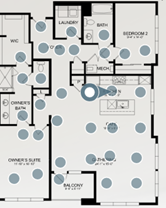
¶ Show targets in 2D
- vr.showTarget2D(value): Shows target spots on 2D floorplan. Value = true/false(default)
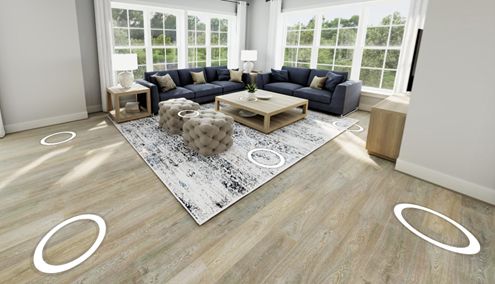
¶ Show targets in 3D
- vr.showTarget3D(alpha): Shows target spots on Scenes. Default alpha = 1, Hide alpha = 0 (range = 0 to 1)
¶ Show door target in 3D
- vr.showTargetsDoor3D(alpha): Shows target door in the scenes. Default alpha = 1, Hide alpha = 0 (range = 0 to 1)

¶ Enable Panning
- vr.enablePanning(value): Allow the camera movement pivots left or right on a horizontal axis. True by default.
¶ Enable Navigation
- vr.enableNavigation(value): Allow to navigate between cameras directly in the 3D scene. True by default.
¶ Enable 2D Navigation
- vr.enable2dNavigation(value): Allow to navigate between cameras directly in the 2D floor plan. True by default.
¶ Enable Zoom
- vr.enableZoom(value): Allow to zoom and change the Field of View of the camera. False by default.
¶ Set Field of View
- vr.setFOV(value): Modify the field of view, between 0.9 and 2, of the camera. 1.2 by default.
¶ Get Image
- vr.getImage(callBack): Create Screenshot of the current view in 1700px/1100px resolution base64 encoded.
¶ Sample Code
vr.getImage(img => console.log(img));
vr.getImage(img => document.body.appendChild(document.createElement("img")).src = img);¶ Download Image
- vr.downloadImage(): Create and download Screenshot of the current view in jpeg 1700px/1100px image.
¶ Clear View Saved
- clearViewSaved : Remove saved view from localStorage.
¶ Sample Code
vr.clearViewSaved();¶ Load View
- loadView(currentViewConfig) : Load specific view.
¶ Sample Code
vr.loadView(true);//Load from local storage
vr.loadView(vr.currentViewConfig);
vr.loadView('{"direction":5.883687289595147,"rotation":{"x":0.28610401462084295,"y":-0.3994980175844394,"z":0},"fov":1.2,"finishes":["ccatblmlla"],"options":["o15"],"package":"Package1","target":"p12"}');¶ Save View
- saveView : Save the current view in localStorage.
¶ Sample Code
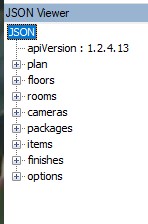
vr.saveView();¶ Download JSON String
- downloadJson(fileName) : Convert and download the plan objects to JSON.
¶ Sample Code
vr.downloadJson();
vr.downloadJson("theplan");
¶ Go To Next/Previous
- goToNextCamera() : Go To the next camera related to the camera index.
- goToPreviousCamera() : Go To the previous camera related to the camera index.
- goToNextLocation() : Go To the next location/room related to the location alphabetic order.
- goToPreviousLocation() : Go to previous location/room related to the location alphabetic order.
¶ Sample Code
vr.goToNextCamera();
vr.goToPreviousCamera();
vr.goToNextLocation();
vr.goToPreviousLocation();¶ Available UX Panel
¶ Panel Variables (Enums)
- ALPHA_VR_PANEL.CAMERAS
- ALPHA_VR_PANEL.FLOORPLAN_2D
- ALPHA_VR_PANEL.FLOORS
- ALPHA_VR_PANEL.LOGS
- ALPHA_VR_PANEL.MENU
- ALPHA_VR_PANEL.OPTIONS
- ALPHA_VR_PANEL.ROOMS
¶ Default CSS Style
.AVPanel
{
    font-family: Arial, "Helvetica Neue", Helvetica, sans-serif;
    font-size: 12px;
    background-color: #FFFFFFAA;
    color: black;
}
.AVPanel h1,
.AVPanel summary
{
    font-size: 14px;
    font-weight: bold;
}¶ Show Floorplan 2D Panel
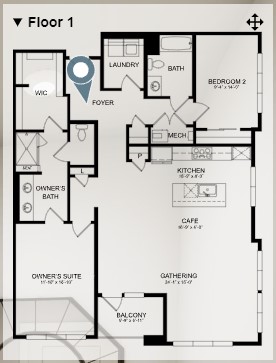
- showPanel(ALPHA_VR_PANEL.FLOORPLAN_2D,containerHtml): Display the 2D floorplan panel on containerHtml. It will display on Scene container if containerHtml is passed empty.
¶ Sample code
vr.showPanel(ALPHA_VR_PANEL.FLOORPLAN_2D);
vr.showPanel(ALPHA_VR_PANEL.FLOORPLAN,document.getElementById("divFloorplan"));//if container doesn't exist, the panel will display in the VR Container¶ Default CSS Style
#divFloorplan2D
{
    width: 250px;
    top: 20px;
    right: 10px;
}¶ Show Menu Panel
- showPanel(ALPHA_VR_PANEL.MENU,containerHtml): Display the menu panel with packages, finishes on containerHtml. It will display on Scene container if containerHtml is passed empty.
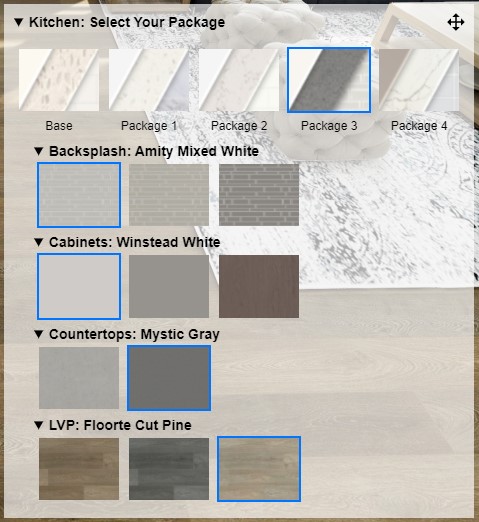
¶ Sample code
vr.showPanel(ALPHA_VR_PANEL.MENU);
vr.showPanel(ALPHA_VR_PANEL.MENU,document.getElementById("divMenu"));//if container doesn't exist, the panel will display in the VR Container¶ Default CSS Style
#divMenu
{
    width: auto;
    bottom: 10px;
    left: initial;
    right: 10px;
    top: initial;
}
#divMenu input[type=radio] + img.current
{
    outline: 2px solid #0075ff;
}
#divMenu img
{
    width:80px;
}
#divFinishes
{
    padding-left: 20px;
    padding-top: 10px;
}
¶ Show Cameras Panel
- showPanel(ALPHA_VR_PANEL.CAMERAS,containerHtml): Display the panel with all cameras of selected room on containerHtml. It will display on Scene container if containerHtml is passed empty.
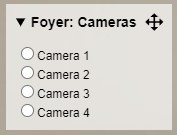
¶ Sample Code
vr.showPanel(ALPHA_VR_PANEL.CAMERAS);
vr.showPanel(ALPHA_VR_PANEL.CAMERAS,document.getElementById("divCamera"));//if container doesn't exist, the panel will display in the VR Container¶ Default CSS style
#divCameras
{
    min-width: 100px;
    top: 10px;
    left: 200px;
}¶ Show Options Panel
- showPanel(ALPHA_VR_PANEL.OPTIONS,containerHtml): Display the panel with all options available on containerHtml. It will display on Scene container if containerHtml is passed empty.
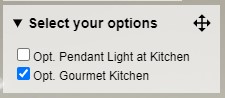
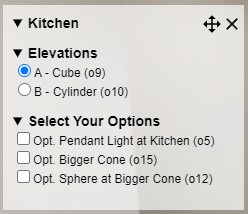
¶ Sample Code
vr.showPanel(ALPHA_VR_PANEL.OPTIONS);
vr.showPanel(ALPHA_VR_PANEL.OPTIONS,document.getElementById("divOptions"));//if container doesn't exist, the panel will display in the VR Container¶ Default CSS Style
#divOptions
{
    min-width: 100px;
    top: 50px;
    left: 200px;
}
¶ Show Floors Panel
- showPanel(ALPHA_VR_PANEL.FLOORS,containerHtml): Display the panel with all available floors on containerHtml. It will display on Scene container if containerHtml is passed empty.
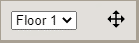
¶ Sample Code
vr.showPanel(ALPHA_VR_PANEL.FLOORS);
vr.showPanel(ALPHA_VR_PANEL.FLOORS,document.getElementById("divFloors"));//if container doesn't exist, the panel will display in the VR Container¶ Default CSS Style
#divFloors
{
    width: 100px;
    top: 10px;
    left: 10px;
}
¶ Show Rooms Panel
- showPanel(ALPHA_VR_PANEL.ROOMS,containerHtml): Display the panel with all rooms of selected floor on containerHtml. It will display on Scene container if containerHtml is passed empty.
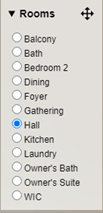
¶ Sample Code
vr.showPanel(ALPHA_VR_PANEL.ROOMS);
vr.showPanel(ALPHA_VR_PANEL.ROOMS,document.getElementById("divRooms"));//if container doesn't exist, the panel will display in the VR Container¶ Default CSS Style
#divRooms
{
    min-width: 100px;
    top: 60px;
    left: 10px;
}
¶ Show Logs Panel
- showPanel(ALPHA_VR_PANEL.LOGS,containerHtml): Display the panel with logs on containerHtml. It will display on Scene container if containerHtml is passed empty.
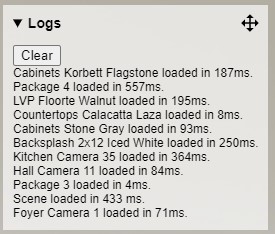
¶ Sample Code
vr.showPanel(ALPHA_VR_PANEL.LOGS);
vr.showPanel(ALPHA_VR_PANEL.LOGS,document.getElementById("divLogs"));//if container doesn't exist, the panel will display in the VR Container¶ Default CSS Style
#divlogs
{
    max-width: 400px;
    min-width: 200px;
    bottom: 10px;
    left: 300px;
}¶ Show Advance Settings Panel
- showPanel(ALPHA_VR_PANEL.ADVANCE_SETTINGS,containerHtml): Display the panel with advance VR settings on containerHtml. It will display on Scene container if containerHtml is passed empty.
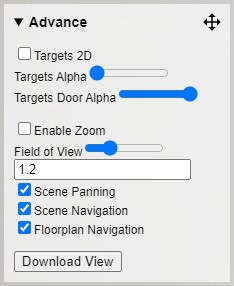
¶ Show Disclaimer Panel
- showPanel(ALPHA_VR_PANEL.DISCLAIMER,containerHtml): Display the panel with VR360+ disclaimer text.

¶ Available UX Events
¶ Events Variables (Enums)
- ALPHA_VR_LISTENER.CAMERA
- ALPHA_VR_LISTENER.FLOOR
- ALPHA_VR_LISTENER.FINISH
- ALPHA_VR_LISTENER.OPTION
- ALPHA_VR_LISTENER.PACKAGE
- ALPHA_VR_LISTENER.ROOM
- ALPHA_VR_LISTENER.READY_TO_USE
¶ Add Camera Event
- vr.addEventListener(ALPHA_VR_LISTENER.CAMERA,function): Create event listener for cameras.
vr.addEventListener(ALPHA_VR_LISTENER.CAMERA,() => console.log(event.target.label + " loaded"));¶ Add Floor Event
- vr.addEventListener(ALPHA_VR_LISTENER.FLOOR,function): Create event listener for floors.
vr.addEventListener(ALPHA_VR_LISTENER.FLOOR,() => console.log(event.target.label + " loaded"));¶ Add Finish Event
- vr.addEventListener(ALPHA_VR_LISTENER.FINISH,function): Create event listener for finishes.
vr.addEventListener(ALPHA_VR_LISTENER.FINISH,() => console.log(event.target.label + " loaded"));¶ Add Option Event
- vr.addEventListener(ALPHA_VR_LISTENER.OPTION,function): Create event listener for options.
vr.addEventListener(ALPHA_VR_LISTENER.OPTION,() => console.log(event.target.label + " loaded"));¶ Add Package Event
- vr.addEventListener(ALPHA_VR_LISTENER.PACKAGE,function): Create event listener for packages.
vr.addEventListener(ALPHA_VR_LISTENER.PACKAGE,() => console.log(event.target.label + " loaded"));¶ Add Room Event
- vr.addEventListener(ALPHA_VR_LISTENER.ROOM,function): Create event listener for rooms.
vr.addEventListener(ALPHA_VR_LISTENER.ROOM,() => console.log(event.target.label + " loaded"));¶ Add Scene Ready to Use Event
- vr.addEventListener(ALPHA_VR_LISTENER.READY_TO_USE,function): Create event listener to listen when the scene is ready to use.
vr.addEventListener(ALPHA_VR_LISTENER.READY_TO_USE,() => console.log(event.target.label + " loaded"));¶ Version History
- 1.2.4
- API initialisation
- Replace CallBack function to Event Listener READY_TO_USE
- Add Preload call back function instead Scene ready to use
- VR objects
- Plan Information
- items by camera
- All finishes in global object
- List items associated with parent instead to show all items available
- Current string of the current view to load
- New VR Functions
- Save View
- Load View
- Get current View Config
- Clear view saved
- Download Json
- Go To
- Next/Previous Camera
- Next/Previous Location
- Panels
- Disclaimer Panel
- Options Panel : Options by category
- API initialisation
- 1.2.3
- Current View
- Scene Rotation
- Sync available items on Option selected
- Download image
- Generate image
- IntegrationId variable
- Option object : select function
- Panel Advance : Display all VR settings availaibe
- New Settings
- Enable Panning
- Enable Navigation
- Enable 2D Navigation
- Enable Zoom
- Set Field of View
- New Settings
- Performance improvment + few issues fixed
- Current View
- 1.2.2
- Initial Release